
Viewing Provider Cost
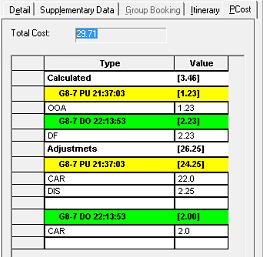
The PCost (Provider Costing) tab in Trip Booking appears only if the trip is to be performed by a provider and a cost will be incurred by the site to pay the provider.
About this task
- Total cost to be paid to the provider
- Calculated provider costing, including:
- Cost break down type, amount, and event
- Total for the calculated value
- Adjustments based on events (NA if no events), including:
- Cost breakdown type (selection), amount, and event
- Total adjustments
Trip information is also provided in the Calculated and
Adjustments information:
- Pick-up trips (PU) and drop-off trips (DO) are color-coded, as defined in user-defined Schedule Editor properties (click , then click the Schedule Editor tab, and Color PU).
- The format for the run on the PCost tab is the run name, followed by PU (pick-up) or DO (drop-off), followed by the time when event is to be performed.
- The value of cost incurred.
- A breakdown of each cost (defined in Cost Breakdown ancillary data) incurred per trip by expense. Additional adjustments can be added as required by clicking the blank row below the last item in the trip's section.
Procedure
- Click .
- Select the client and specify the trip's details.
- On the Detail tab, click a Provider in the list if one is not already selected.
- Click the Save button:

- Click the PCost tab to see the provider cost breakdown.
- Review and update the information as required.