
About Creating Daily Runs
One of the principal functions of the Build Weeks step is to allow you to assemble daily runs into weekly work assignments that drivers may bid on.
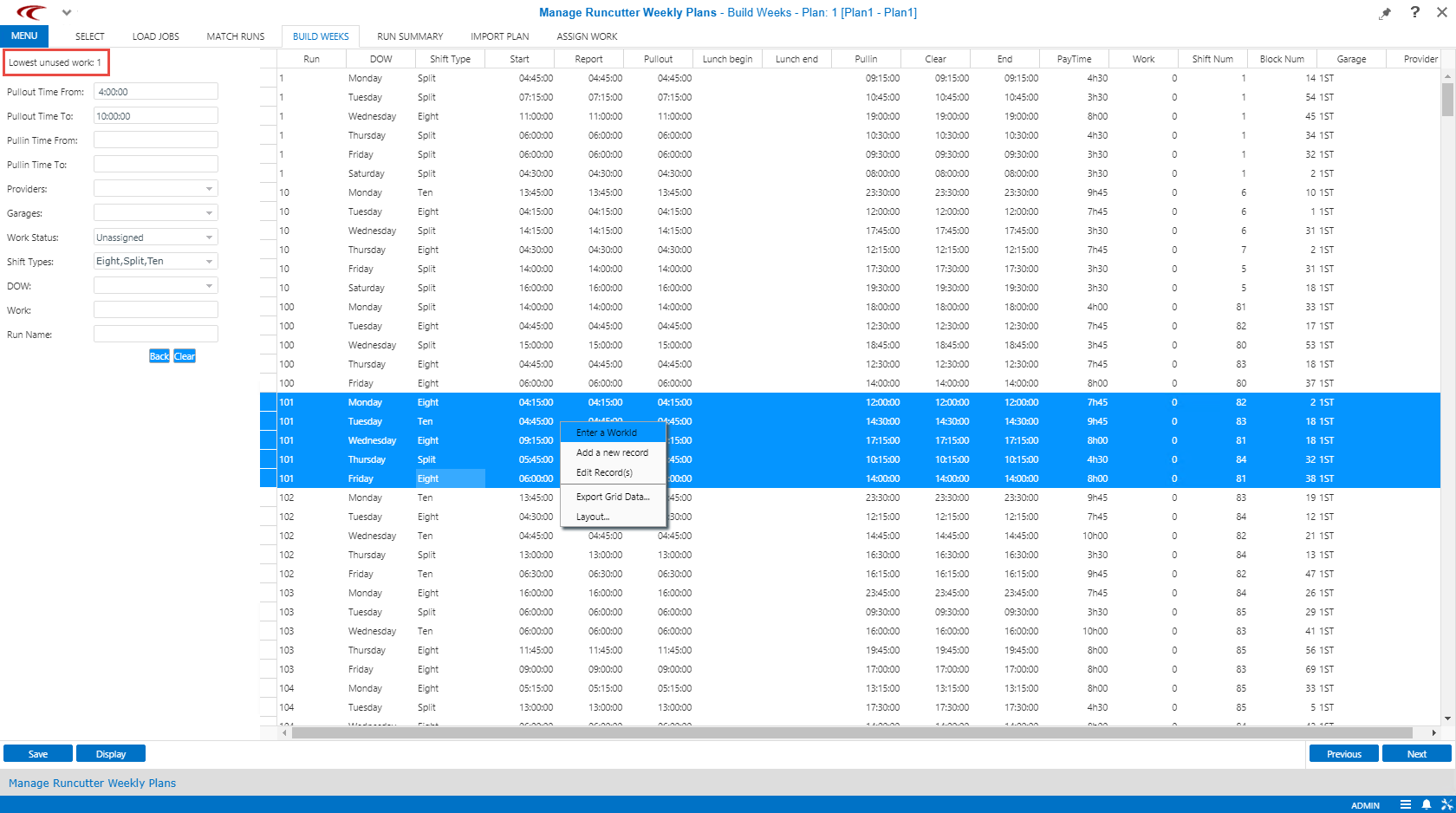
To do this, use the filters to select a particular shift type and time range to find candidate runs to combine. For example, you might set a filter to look for eight-hour straight runs starting between 5:00 A.M. and 7:00 A.M. These can be combined to form five daily morning straights. When performing this task, set a filter to show only unassigned work so that runs that have already been assigned are not shown.
When selecting split shifts for work assignments, if the A.M. or P.M. run of a split shift is selected, the system assumes that the other half of the shift should be assigned as well. This makes it much easier to work with time filters, for example, looking only at 5:00 A.M. to 7:00 A.M.
To assign work, press the CTRL key and click all of the runs to combine. Right-click and click the Enter a WorkId option. The next available unused Work ID is shown in the top left corner of the screen.
The results of the rostering are shown on the Assign Work step, the last step in the navigation bar.
A best practice is to open the Build Weeks step and the Assign Work step so that they are both shown in the task bar. Then you can switch between seeing the finished rosters on the Assign Work step and the filter set in the Build Weeks step without losing filter settings.