
Configuring Polygon Color and Outline
The Style command is available for most polygon types, but might be unavailable in some data sets.
Before you begin
Procedure
- Search for the polygon record to style.
-
Right-click the polygon and click Style.
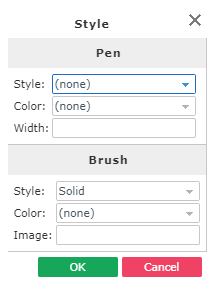
The Style dialog box appears.
-
Under the Pen heading, specify the following:
- Style
- The style of the polygon’s outline.
- Color
- The color of the polygon’s outline.
- Width
- The width of the polygon's outline.
-
Under the Brush heading, specify the following:
- Style
- The type of the polygon’s fill color.
- Color
- The polygon’s fill color.
- Image
- The polygon’s background image.
Trapeze recommends using a solid pen style, a bitmap brush style, and bright colors against which black text is legible.