
Sharing and Unsharing Polygons
Polygons can be shared amongst multiple polygon types.
Before you begin
About this task
If you make a change to a shared polygon, the change is copied to the data set with which it is shared.
Procedure
- Search for the polygon record to share or unshare.
-
Right-click the polygon to be shared and click Share.
The Select Dataset dialog box appears.
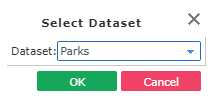
- From the Dataset list, select the data set with which you want to share polygons.
-
Click OK.
The current data set’s polygons are shared with the selected data set. Shared data sets are listed in the polygon’s details.
- To remove the sharing function between data sets, right-click the polygon and click Remove Shared.