Assigning garages in the bus graph is similar to performing garage assignments in the
Blocking screen in Trapeze FX.
If you create a new block or have an existing block with missing pull-outs or
pull-ins, you can assign garages to the block directly on the bus graph.
Select the block to which you want to assign a garage.
Right-click on the grid and from the shortcut menu, select Assign
Garage.
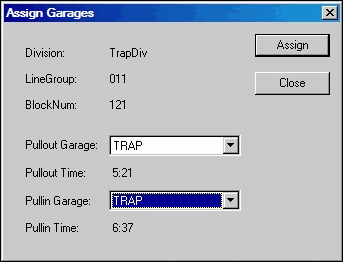
The Assign Garages dialog appears.
From the Pullout Garage
list, select the appropriate garage.
From the Pullin Garage list, select the appropriate garage.
Click Assign.
Click Close.
On the Bus Graph screen, the pull-out deadheads are shown at the
beginning or end of the line representing trips. The following graphic shows an example of a
pull-out deadhead:
The colors
of the different types of deadheads are as follows: