
Saving Block Scenarios
Save the block scenarios whose parameter settings you may want to apply or reuse for other run solutions.
-
On the main menu, click Blockbuster > Block
Scenario. Alternatively, on the screen toolbar, click the Block Scenario button:
The Block Scenarios dialog opens.
-
Click Save.
The New Scenario dialog opens.
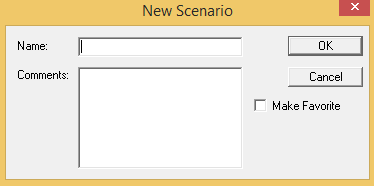
- In the Name field, type a name for the new scenario.
- Optional: In the Comments field, type a description or information on the scenario.
- Optional: Select the Make Favorite check box if the scenario is one that you want to easily access or expect to frequently use.
- Click OK. The scenario is added to the grid in the Block Scenarios dialog.