
Generating Exception Deadheads
This function automatically generates and updates missing interline deadheads for each exception combination. It is only enabled if you have exception deadheads.
Note: This feature is activated when you are not using implied deadheads.
-
Click .
The Generate Exception Deadheads dialog box appears.
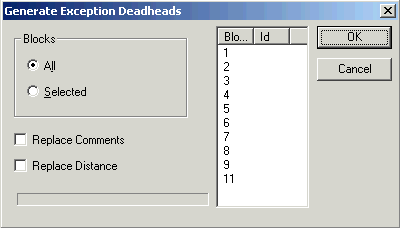
- To generate exception deadheads for all blocks, select the All option.
- To generate exception deadheads for selected blocks, select the Selected option, and then select the blocks that you want on the right section of the dialog box.
- Optional: To replace the existing comments and/or distances, select Replace Comments and/or Replace Distances, accordingly.
- Click OK.