
Exporting Booking Records
After finding bookings in Trip Administration, you can export booking records to a text (.txt) file or to Microsoft Excel.
Before you begin
Procedure
- Find the bookings that you want to export.
-
Click the Print button:

The Select Grid Columns dialog box appears.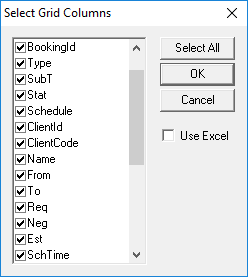
- Select the check boxes for columns to export, and clear the check boxes for columns that you do not want to export.
- Optional: To export the information to Microsoft Excel, select the Use Excel check box, or leave the Use Excel check box clear to export the records to a text file.
-
Click OK.
A text or Excel file with the exported booking records appears.