
Using the Quick Schedule Booking Wizard

You can use the Quick Schedule Booking Wizard for bookings that do not require a great deal of detail and for which you want to schedule bookings quickly.

About this task

The Quick Schedule Booking Wizard, like the classic Schedule Booking Wizard, allows you to perform basic scheduling functions such as finding solutions, finding solutions within an expanded window, editing the pick-up or drop-off request time, and editing the booking subtype.

Procedure

  1. In Trip Booking, Trip Administration, or Schedule Editor, select a trip.
  2. Hold the CTRL and SHIFT keys and click the Schedule button:
    Three times: 1:07, 1:10, and 1:40.
    The Quick Schedule Booking Wizard appears.
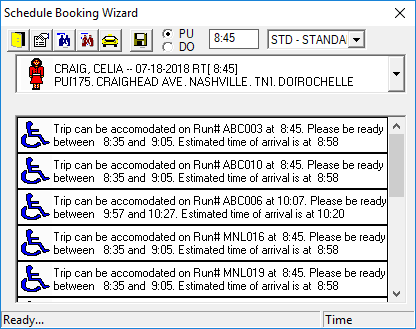
    The Quick Schedule Booking Wizard showing the trip to be scheduled and four scheduling options.