
Generating Exception Runs After Runcutting
Generating exception runs refers to the runs associated with exception combinations other than what you selected as the default.
-
Click .
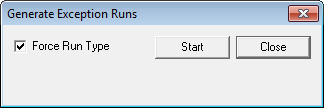
The Generate Exception Runs dialog appears.
-
To automatically ensure that generated exception runs
keep the run type set as the default, select the Force Run Type check box.
Applying the Force Run Type feature prevents possible issues in rostering when runs that contain exceptions become illegal on some exception days, for example, a run that has School Open trips at the end of the day becomes shorter when school is closed. In other words, it forces the exception runs to remain legal.
-
Click Start.
The system generates the runs for the other exception combinations in the service group based on the runs in the exception combination set as the default. A bar at the bottom of the Generate Exception Runs dialog shows you the progress of the process.
If the BlockBuster Generate Runs for Exceptions Off system property is set to Yes, the system generates all runs.
- Click Close.
Run names are also copied aside from run numbers when generating exceptions. (They do not necessarily always have the same values.)