
Setting Shuttle Parameters
The Shuttle parameters that you define depend on your shuttle rules and constraints.
-
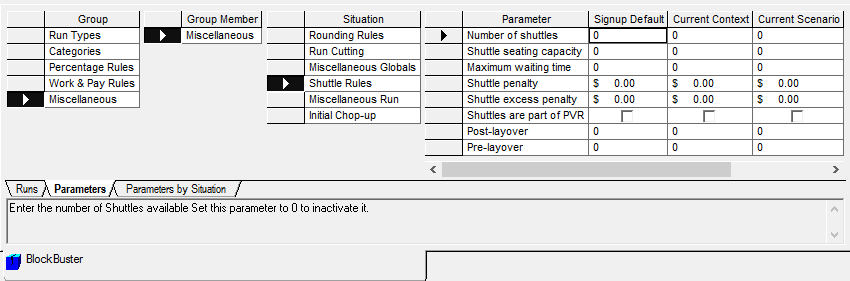
On the Parameters tab, click as shown in the following graphic:
-
Set any of the following parameters under Shuttle Rules:
- Number of shuttles – Number of vehicles that will be used as shuttles.
- Shuttle seating capacity – Number of drivers in the shuttle vehicles not including the driver of the vehicles.
- Maximum waiting time – Number of minutes that a driver is required to wait for the shuttle arrival or departure.
- Shuttle penalty – Penalize the use of shuttles you have set. (do not use shuttle if possible) Shuttle excess penalty – Penalize each shuttle to keep the number as low as possible.
- Shuttles are part of PVR – Add the number of shuttle vehicles to the total of Peak Vehicle Requirements. This is used if buses are the actual shuttle vehicle.
- Post-layover – Amount of time that the shuttle waits after relief.
- Pre-layover – Amount of time to arrive at location early.
-
Set the following parameters under Miscellaneous Run:
- Assume zero node to same node travels - Clear all check boxes.
- Allow break travel to garage - Select all check boxes.
- After each parameter that you set, click Save.