Place text in quotation marks for exact match search results.
Adding Park At Deadheads
You can designate a point in between the blocks to or from which you can add deadheads
called Park At deadheads.
You can choose to add this type of deadheads to one or many selected blocks. Do this
after blocking with some exceptions such as non-school exceptions and you find that gaps exist
in your blocks. You can also add deadheads in between blocks.
Note: Adding Park At deadheads
is used by transit sites that do not use implied deadheads.
Click Blocking > CreateParkAt Deadheads.
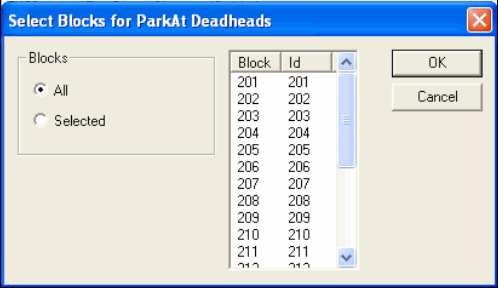
The Select Blocks for ParkAt Deadheads dialog box
appears.
The All option is selected by default.
Perform one of the following steps:
To insert the deadheads in all blocks, click OK.
To insert the deadheads only on certain blocks, click Selected
and select the blocks you want in the right frame.