As with garages, assign divisions to the blocks you created to ensure the blocks are
considered in the runcutting process for the correct division.
-
On the Blocking tab, click .
The
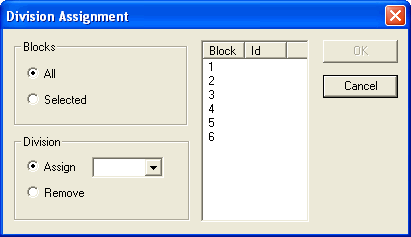
Division Assignment dialog box appears.
-
To assign all of your blocks to a particular division, select
All.
- Optional:
To assign only some blocks to a division, select the Selected
option and select the blocks to which you want to assign a division.
-
In the Division frame, select the division to which you want to
assign your blocks in the Assign drop-down list.
-
Click OK.
-
Press F5 to refresh your screen.
If you added the Division column to your supplementary data, you should see the
divisions you assigned to your blocks.
-
To remove the division assigned to a block, perform step 2 or 3 and select the
Remove option.
