Place text in quotation marks for exact match search results.
Shifting Times With the Shift Tool
The Shift Tool is a utility that allows you to shift trips in Trip Building, Blocking,
and Runcutting. It enables you to see the effect of shifting times on trips, blocks, runs and
rosters of which the trips are a part.
Shifting trip times may be necessary to accommodate passenger transfers or for
operational reasons.
Note: The Shift Tool is available in the Trip Building and
Blocking menus and in the Reliefs dialog box
in the Runcutting screen.
On the Blocking grid, select the trips whose trip times you want
to shift.
Click Blocking > Shift Tool.
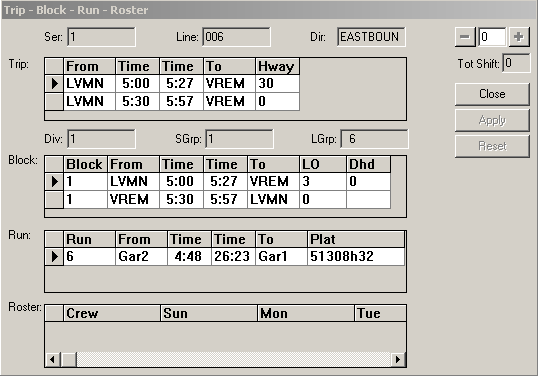
The Trip-Block-Run-Roster dialog box appears.
In the Block frame, select the trip you want to shift.
In the field on the upper-right corner of the dialog box, type an increment (in
minutes) by which you want to shift the time. Click the minus sign (-) button to shift the
time backward.
Optional: To shift the time forward, click the plus sign (+) button. As you click the (+) or (-)
button, the time advances or reverses in increments.
As you adjust the time to what you want, you can see the effect on the trip, block,
run, and roster (depending on what stage you are in the scheduling process).
Do one of the following:
Click Apply.
Click Reset to clear the changes and return to the original
trip time.
Click Close or the X button on the
upper-right corner of the dialog box to exit.
Note: Shifting trips that are part of a run can make the run invalid (illegal). Go to
the Runcutting screen to see more fully how the shift affected
the runs. Perform an Update Costing to maintain the
runs.