
Creating Sets of Line Groups
You can combine On Days optimally by putting together only runs that operate on the same major line or on a defined group of lines. for group of trips or lines together to create blocks, a series of continuous runs optimally.
Check the potential effects of using sets of line groups in the Rostering Penalties dialog box.
-
In the Optimize On frame, click the button beside the Line check box:
 The Define Sets dialog box appears. The list of line groups appears on the Line Groups frame.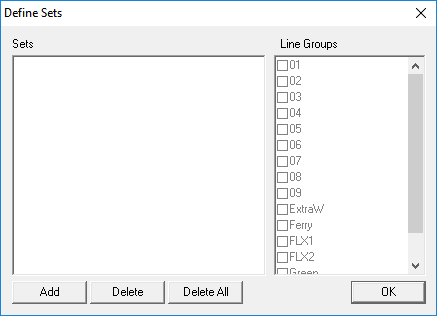
-
Click Add.
The word "Empty" appears on the left frame.
- Click the word Empty. The Line Groups frame is activated.
-
Select the line groups you want to combine.
The selected line groups appear on the Sets frame.
-
To create another set of line groups, repeat steps 2 to 4, and
then click one of the previously created sets.
The new set is added to the Sets frame.
-
Perform one of the following steps:
- To add line groups to previously created sets, click the set and select the line groups you want to add, and then click another set in the list.
- To remove line groups from a set, click the set and clear the check box of the line groups you want to remove, and then click another set in the list
-
Click OK.
The Line check box appears selected in the Group Byframe.