
Viewing Costing Values
The Costing function calculates the work characteristics of single rosters. The costing is related to your Costing Constants.
The Costing dialog box shows the roster type, whether it is legal or not and the costing of the roster.
- From the Rostering grid, select the roster whose costing you want to view.
-
Do one of the following:
- Click .
- Click the Costing button:

The Costing dialog box appears.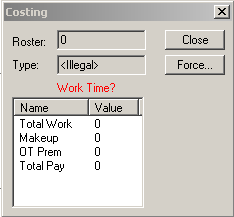
If you have an illegal roster, the name of the item that makes the roster illegal appears in red with a question mark.
- Click Close.