Working with Report Pages
Duplicate, rename, delete, or hide report pages as needed.
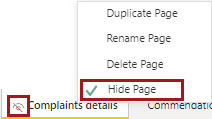
Right-click on the report page tab and do one of the following:
- Duplicate Page. Create a copy of the report page.
- Rename Page. Change the name of the report page.
- Delete Page. Remove the report page.
- Hide Page. Prevent consumers (and power users in
Reading view) from seeing the report page unless a drill through option is
used. To indicate the page is hidden, an eye symbol is visible on the report
page tab and the Hide Page option is selected.