About Dispatch Center
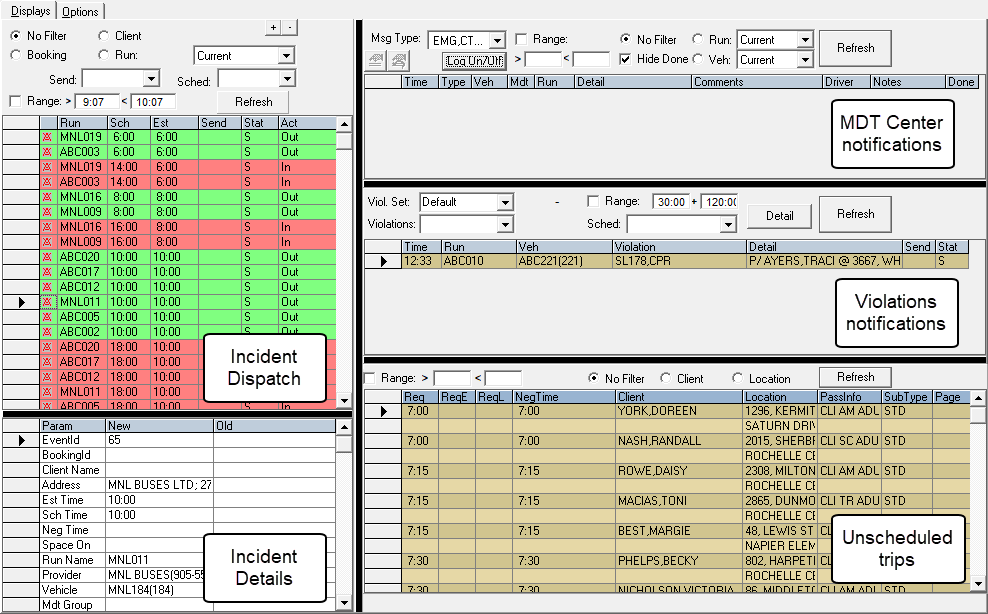
Dispatch Center allows you to perform the same activities as in Dispatch but offers additional information and functionality found in Schedule Editor and MDT Center.
- Incident Dispatch
- Like the Incidents tab in Dispatch, this grid allows you to
monitor events that are scheduled to occur but have yet to be dispatched to the driver.
Additional incidents are created and added to the list when a change has been made to a schedule. For example, a client has canceled, adjusted a pick-up or drop-off time or location.
- Incident Details
- When you select an event in the Incident Dispatch grid, this
grid shows detailed information related to it.
This grid can be hidden from view.
- MDT Center notifications
- For use at sites with MDTs. This grid provides the same MDT notifications as the MDT
Center screen.
You can filter by Msg Category, Msg Type, Run, and Vehicle.
- Violation notifications
- This grid shows runs with violations.
Filter by violation set and time.
Violation set filtering can be further filtered by items within the selected violation set.
Toggle directly to the details (trip level).
- Unscheduled Trips
- This grid shows unscheduled trips.
Filter by time range, client, subtype, or location.
Filtering unscheduled trips by subtype is useful for including or excluding will-call trips.
Each grid can be updated in real time so that the dispatcher constantly has current information about events that require attention.