
Filtering Eligibility Tests
If numerous eligibility tests have been created, the list of tests can be filtered to show specific tests.
Before you begin
Procedure
-
Click Filter.
Filtering mode is enabled and the Cond Code field is highlighted.
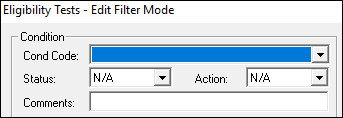
- Type or select the criteria by which to filter.
- Click Display.
- To clear the filter and show all eligibility tests again, click Clear Filter.
- Click Filter again to exit filter mode.