About Viewing Eligibility Test Results
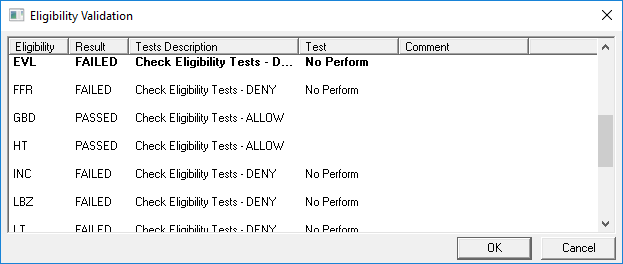
Eligibility test results are shown prior to saving or scheduling a trip booking.
Eligibility tests determine if clients meet criteria that allow them to book specific trips.
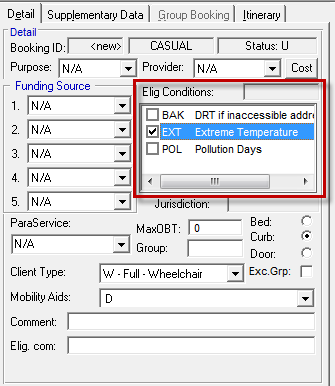
When a trip has been created in Trip Booking, an eligibility condition can be selected by
clicking the corresponding check box in the Elig. Conditions field on
the Detail tab. Note that some conditions are subjective and must still
be determined by the reservationist. These eligibility conditions can be shown when they are
assigned to a client.
When eligibility testing is enabled, clicking the Save button or the Schedule button will show the results of any eligibility rule or a test associated with that eligibility condition and that has a relevant date range.
If the result is that the trip is denied, the user should press Cancel and choose an alternate eligibility condition. If the result is that the trip is allowed, the user should press Okay and continue on with scheduling the trip.
Note that eligibility test results can be enforced by removing the user permission in the
Trapeze6 Client Shell () for overriding a failed test.
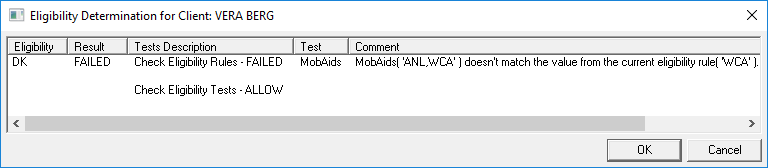
If the default eligibility condition is not a basis for allowing the trip, the call taker can
test all eligibility conditions by clicking the Client Eligibility
Rules button:

Clicking this button will show a preview of whether some other eligibility in the condition
might be legitimate for booking the trip to saves time from testing them one at a time.