
Calculating Fare By Distance
In the Fare Type ancillary data dialog box, the Distance ($/Distance Unit) field allows you to set a value by which fare is calculated for every mile traveled on the trip.
Before you begin
About this task
After you create a fare by distance, you can select the associated fare type when creating bookings. The system calculates the fare based on the distance of the trip and the defined rates. The calculated fare is the sum of all fares (that is, flat, distance, zone, and time) specified in the Fare Types dialog box and in the Fare Distance dialog box.
Procedure
- Click .
- Create a fare type or select one from the list.
-
Click the Fare Distance button.
The Fare Distance button allows you to set up additional rates for fare types based on distance ranges.The Fare Distance dialog box appears.
-
In the Rate frame:
-
In the Distance(Distance Unit) field, enter
the point at which a specific distance rate is calculated.
Important: For example, if you enter 10, the system calculates the fare by distance once the trip has reached or exceeded ten Distance Units.
-
Click Add.
The distance rate is added to the fare.
- Create any additional distance fares.
- Click Close.
Example
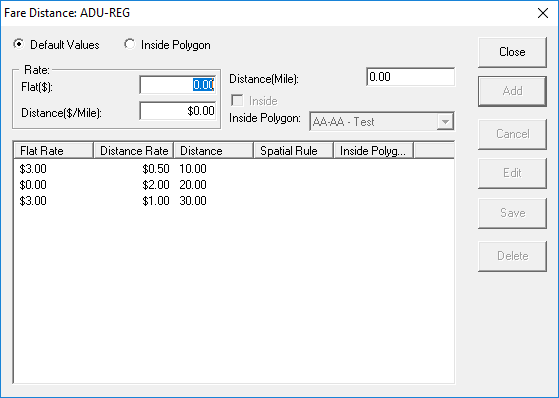
Using the first rate: flat rate + (trip distance × distance rate) = distance fare.
In this example, the distance fare is: (3+15x0.5) = $10.50.
This total ($10.50) is added to all other fares defined for the fare type in the Fare Type dialog box to reach the actual fare charged to the passenger.