
Locating a Polygon's Jurisdiction Polygon ID
Some fare types reference one or more jurisdiction polygon IDs to include them in or exclude them from a depends-on rule.
About this task
These numbers need to be noted for each city fare zone and rural area for which a fare will be charged, or from which a passenger will be transported.
Procedure
- Click .
- In the upper-left corner of the screen, click the polygons' Fare Zone Type in the drop-down list.
- Click the polygon listed for the fare zone type.
-
Click the Edit button:

-
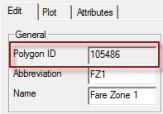
On the Edit tab, note the number in the Polygon
ID field in the General frame.
- Click OK.