
Creating Fare Type Variations
If a fare varies because of certain conditions, a fare type variation can be applied to alter the applied fare.
About this task
Procedure
- Click .
- Create a fare type or select one from the list.
-
From the Variation Of drop-down list, select a fare type that
the original fare is based on.
This field specifies that the fare type is a variation of another fare type. When the conditions specified in the Depends On functionality arise, the original fare type will be replaced by this fare type.The Depends On button is activated.
-
Click the Depends On button.
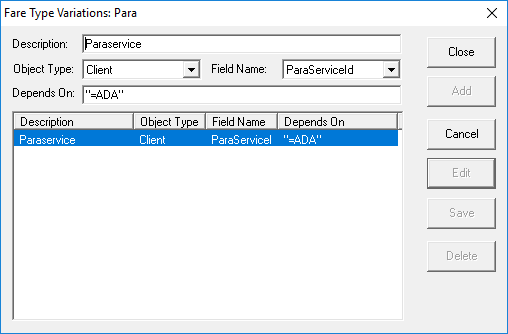
The Fare Type Variations dialog box appears.
-
In the Description field, type a description of the fare type
variation condition.
The description can be up to 50 characters long.
-
From the Object Type drop-down list, select the object.
This is the (table) from which the booking/passenger information that is compared against the entry in the Depends On field is taken.
-
From the Field Name drop-down list, select the field containing
information that is compared against the entry in the Depends On
field.
The choices that appear here are dependent on the Object Type (that is, they are the fields that are present in the selected Object Type).
- In the Depends On field, enter the equation that determines whether the fare type variation is activated.
- Click Add.
Results
Example
The client must be more than five years old for the example fare type variation to be
applied.
| Field | User Input | Description of User Input |
|---|---|---|
| Description | Age of Passenger | The client’s age. |
| Object Type | Client | Client information taken from the Clients table. |
| Field Name | DateOfBirth | The specific field information is taken from in the Clients table. |
| Depends On | >Age(5) | Client must be over five years old for the fare type variation to be applied. |