
Determining if a Client Belongs to a Group
You can check to see if a client belongs to a group from Trip Booking.
Before you begin
Procedure
- Search for and select the Client.
-
Select the Group check box.
If the chosen client is part of a group, this group is automatically selected to appear in the Client field. If this client belongs to more than one group, a list containing a list of groups appears in the Client field.
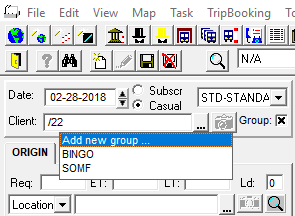 Note: This functionality is only available if you have Trapeze4 on your main computer screen. If the application is used on a secondary computer screen, the first option in the list is selected automatically or no options are suggested.