
Setting the Dividers
The dividers refer to the vertical lines that identify the start or end of a trip, relief or piece.
-
Click .
The View Setup dialog appears with the General tab open by default.
- In the Dividers frame, select the type of divider: Trip, Relief, Piece.
-
Click Change.
The Edit Divider dialog appears.
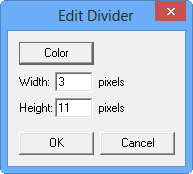
- Click Color. In the Color dialog, choose the color you want to apply on the divider.
- In the Width and Height fields, type the number of pixels you want to set as the dimensions for the dividers.
- Click OK.