
About Using Min Stay and Max Stay
For bookings belonging to an itinerary, you can specify the duration of time a client is to stay at a specific location before traveling to another location.
Minimum and maximum duration of stay can be used along with or instead of requested early and late times for all trips in an itinerary except the final trip to be performed.
The Schedule Server looks for solutions that accommodate duration of stay as well as request times.
Example 1
Mr. Oak wants to travel first from his home to his doctor’s office for an appointment at 10:00. He is expected to stay at least an hour. From his doctor’s office he wants to visit a friend for two to three hours and then return home.
- For the first trip (CH to doctor’s office), type 10:00 in the Destination LT field. Then, in the Min Stay field (on the Supplementary Data tab), type 60. Note that the system reads the value as minutes.
- For the second trip (Doc to friend), type 120 (or 2h00) in the Min Stay field and type 180 (or 3h00) in the Max Stay field. No request times.
- For the third trip (Friend to CH), there is no min stay/max stay and no request times.
Example 2
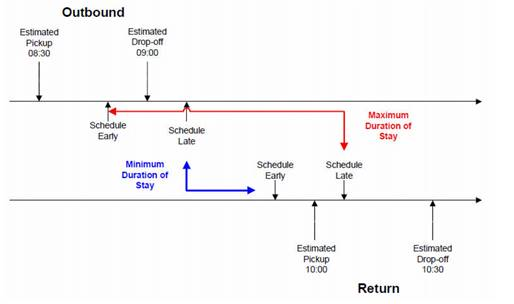
- For the outbound trip, in the Origin tab Req field, type 9:00 (the time shops open). Then, type 30 in the Min Stay field and 60 in the Max Stay field.
- For the return trip, in the Origin tab LT field, type 11:00.
Mrs. Smith is picked up no earlier than the Schedule Early tolerance and no later than the Schedule Late tolerance. At the shops, she stays a minimum time of 30 minutes and a maximum time of 60 minutes or until the Schedule Late tolerance of the return trip—whichever comes first.