
Renumbering Blocks Function
On the Blocking grid, the blocks are automatically numbered consecutively starting from number 1.
To change the Block numbers and to make the block ID specific to your transit site, use the Renumber function.
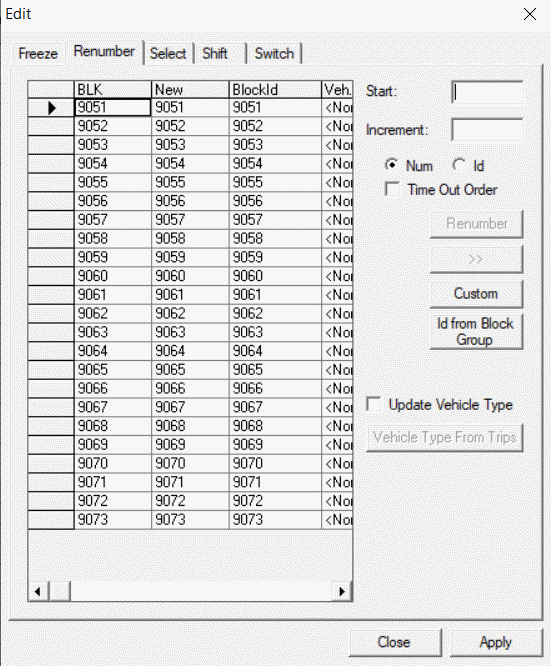
You can type the changes you want manually on the Renumber tab or let the system apply the changes you want automatically using the Custom or Id from Block Group options.
To apply custom numbering to your blocks, please contact your Trapeze representative.
| Option | Description |
|---|---|
| Num (Number) | Trapeze4 uses one number for each block to keep track of them. |
| Id (Identification) | Serves as a second identifier. This identifier is typically customized and used on custom reports such as Block Paddles. |
| Time Out Order | If selected, blocks are numbered based on the From time. |
| Update Vehicle Type | If selected, the Veh Type column in the left section of the dialog is shown and the Vehicle Type From Trips button is enabled. If not selected, the Vehicle Type From Trips button is not enabled and the vehicle types are not updated when users click Apply. The Veh Type column is shown but is in read-only mode. |
| Vehicle Type From Trips | This is only enabled if the Update Vehicle Type option is selected. If selected, the Vehicle Type column is updated showing the same vehicle type for all trips if all the trips on the block have the same vehicle type applied to the trips. |
Attention: When renumbering blocks, FX checks for blocks that are not included
in the current context to avoid errors such as duplicate block numbers. An error message
appears when duplicate block numbers are created if you select another exception
combo.