
Automatic Runcutting
Automatic runcutting enables you to try all the appropriate run types you want to cut for the current division and service on which you are working, looking to achieve the right number of runs (or operators) per category.
-
On the main ribbon, click Runcut.
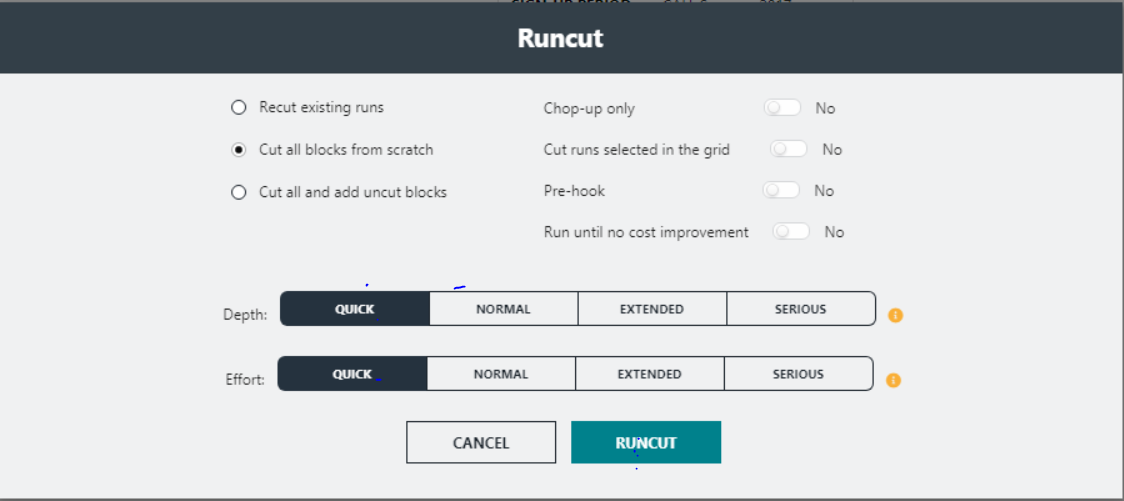
The Runcut dialog appears.
-
Choose the type of runcut you want the system to perform based on your
requirements:
-
Recut existing runs- Select to build on an existing runcut. This is selected by default and is generally the most used option.
This option causes BlockBuster to recut all items that have been previously cut.
Use this option when performing incremental improvements to a runcut. The system does not cut pieces that are uncut (listed on the Uncut Pieces grid).
- Cut all blocks from scratch - Select if the
blocks have not been previously cut. This option is used only in either
of these specific situations:
- The blocks have not been cut previously (All Uncut).
-
The service has changed to such an extent that there is very little similarity between the new schedule and the
old schedule. For example, routes have been extensively redefined.
- Cut all and add uncut blocks - Select to create runs from the Uncut Pieces and add them to the runs in the Cut Pieces grid or to recut a run. (This recuts existing runs.)
-
-
In the Depth and Effort row of
options, select the appropriate level of depth and effort that the system will
apply. The progressive levels that you can use in varying combinations are:
- Quick- This is set as the default.
- Normal
- Extended
- Serious
Note: The more complex the selected option for Depth, the longer the process will take. - Optional:
Select other filters as applicable:
- Chop-up only – If set to Yes, the system first cuts the one-piece runs and uncuts pieces into reasonably-sized one-piece runs according to your selected parameters. The system then attempts to create legal runs from these segments and the remaining pieces.
- Pre-hook – If set to Yes, the system attempts to create cheap runcutting solutions by putting the one-piece runs created in the initial chop-up into two-piece runs. Make sure to select the Chop-up Only check box also when using this feature.
- Cut Selected Only – If set to Yes, the system cuts only the runs you selected on the grid. This is used in conjunction with the Cut all and add uncut blocks runcutting option.
- Run until no cost improvement – If set to Yes, the system checks the total cost of the runcut until it stops getting better results.
-
Click Runcut.
A progress bar shows the status of the runcut.
The runs that have been cut appear in the Cut Pieces grid.