
Manual Runcutting
Manual runcutting is the process of cutting block pieces at relief points or creating full blocks as runs to form operator assignments.
- On the Uncut Pieces pane, which is on the right section of the screen, click the piece that you want to cut.
-
On the footer, click Manual Runcutting:
 The Manual Runcut pane replaces the Cut Pieces pane on the left section of the screen.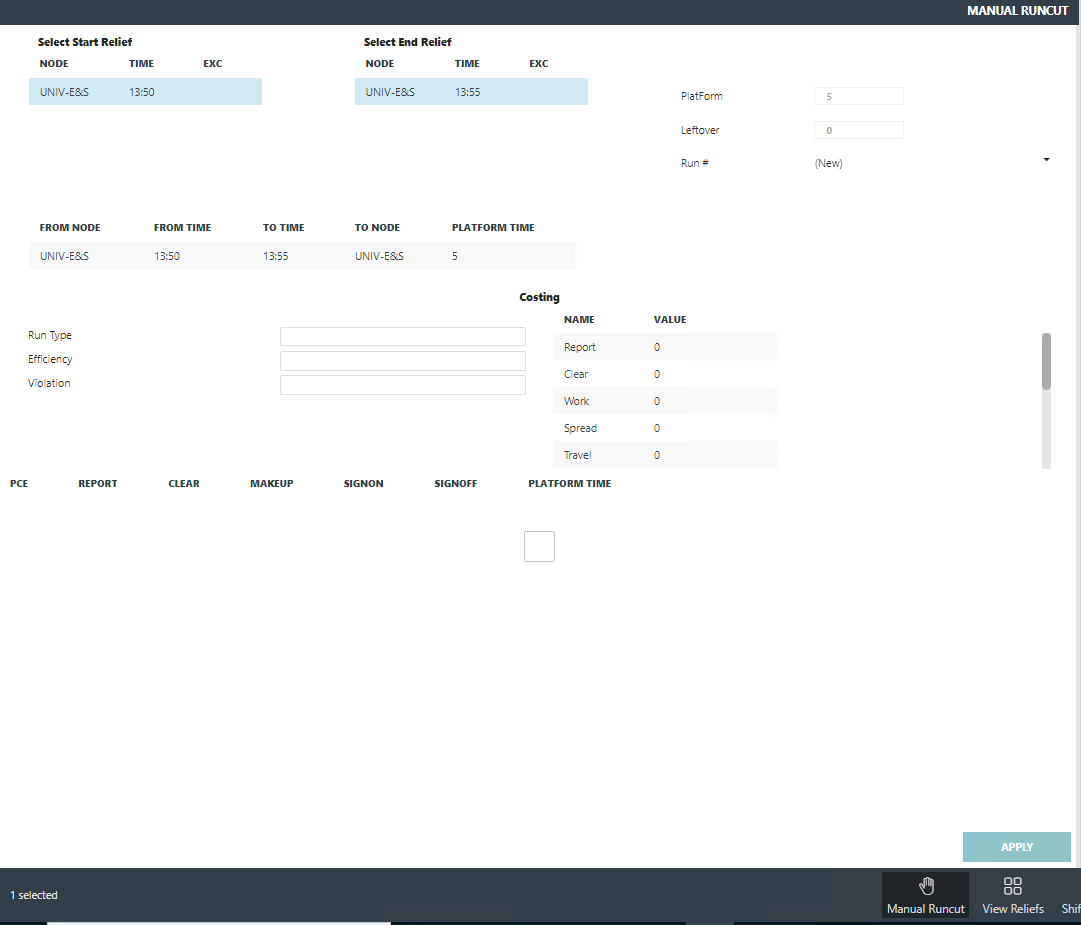
- On the Select Start Relief list, click the relief point (node) or garage from which the run is to begin.
-
On the Select End Relief list, click the relief point
(node) or garage to which the end is to end.
The values of the segment selected appear in the Platform and Layover fields.
- In the Run# field, type an appropriate run number. If you do not type a number, the system automatically assigns the run with the next available run number.
- Review the statistics of the potential run shown in the dialog. It shows the start and end times as well as the calculated platform of the piece.
- Repeat the steps until you arrive at the runcutting solution that you want.
-
Click Apply.
The run appears in the Cut Pieces pane.
- If you have other uncut pieces, repeat steps 1 - 9 or use the Automatic runcutting feature.
- Click Close.