Place text in quotation marks for exact match search results.
Runs Tab Features
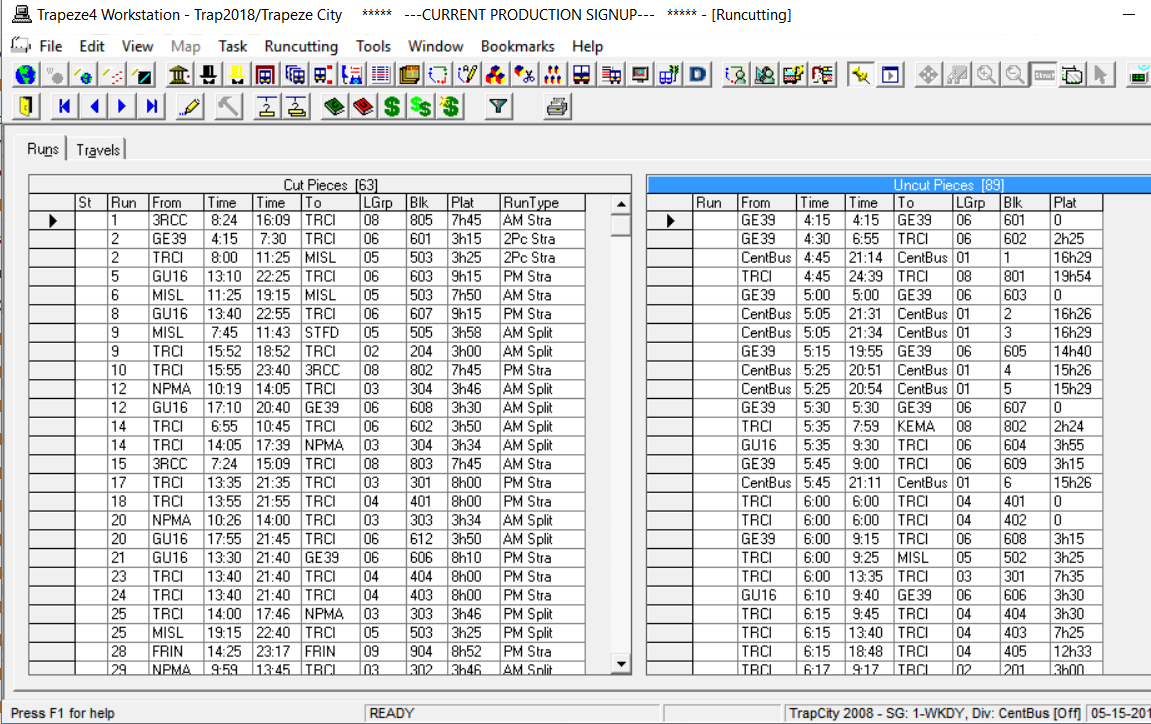
The Runs tab contains two grids: Cut Pieces
and Uncut Pieces.
The following graphic shows the Runs tab with sample data:
The Blocked data from the Blocking screen that has not been runcut yet
appears in the Uncut Pieces grid.
The number of pieces shown in each grid appears beside the grid label in parentheses, for
example, Uncut Pieces (2).
The following table explains the column headers which appear in both grids.
Table 1. Run Tab Features
Options
Descriptions
St (Status)
This column appears only in the Cut Pieces grid. It
may display any of the following letters which indicate that an
action/condition was applied on the run:
F (Frozen): Run can not be modified.
C: A legal run that has a forced travel.
M (Modified): An illegal run forced to be a particular run type. This
is also used as a flag to indicate that the run is not to be
changed.
N (Not legal): Run does not comply with the Contract Rules.
Run
Number applied to a specific run.
From
Abbreviated name of the relief point or garage from which the piece of
the run starts.
Time
Time at which an operator starts a piece of his or her run.
Time
Time at which the operator ends a piece of his or her run.
To
Abbreviated name of the To location (relief point or garage) at which a
piece of run ends.
LGrp (Line
Group)
Line group to which a block belongs.
Block
Block number from which a piece was cut.
Plat
(Platform)
Total time that an operator is scheduled to drive a vehicle. The components
of the platform depend on the policies and union agreement of the transit
site.