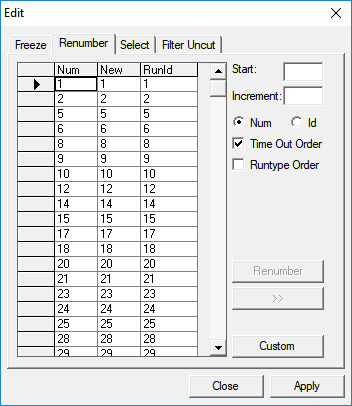
FX uses a number as a unique identifier to keep track of the runs.
The RunId is used as a second identifier. This second number is
typically customized and used on custom reports such as Driver Paddles.
-
On the Runs tab, click the Edit
button:

The Edit dialog box appears.
-
Click the Renumber tab.
- Optional:
To have the system apply your custom RunId, click
Custom.
-
To change the run number, click Num.
-
To update the RunId, click
Id.
-
In the Start field, type a beginning number.
-
In the Increment field, type a number by which you want the
numbers to increase.
-
Click Renumber.
- Optional:
If you want the RunId to be the same as the existing
Run number, click the double greater than
(>>) button.
- Optional:
Choose an option to re-sort your runs:
- Time Out Order (based on the From time)
- Runtype Order (based on the order in the Union
Contract dialog box at the same time, which also respects the From time
order)
-
Click Apply.
-
Click Close.