Place text in quotation marks for exact match search results.
Viewing the Block Summary
The Block Summary shows the values of a selected block piece.
Perform one of the following steps:
In the Cut Pieces grid of the Runcutting
screen, select the run whose block summary you want to view.
In the Uncut Pieces grid of the
Runcutting screen, select a block piece.
Click Runcutting > Block Summary.
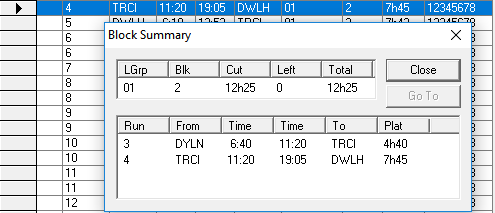
The Block Summary dialog box appears.The upper frame shows the total values of the uncut piece. The bottom frame shows
information on each of the runs and/or the remaining piece of the selected block. If some
runs had been previously cut from it, the data on the runs also appears in the bottom
frame. Note the Run number assigned to the pieces that have been cut.
Optional: To view a piece in the Cut Pieces or
Uncut Pieces grid, select it in the lower frame of the dialog box
and click Go To.
The arrow in the marker column moves to the appropriate piece in either
grid.