
Manual Runcutting
You can use Manual Runcutting with the options provided.
To open the Manual Runcutting dialog box, click .
The following graphic shows the Manual Runcutting dialog box with the time of the first node in the Uncut Pieces grid:
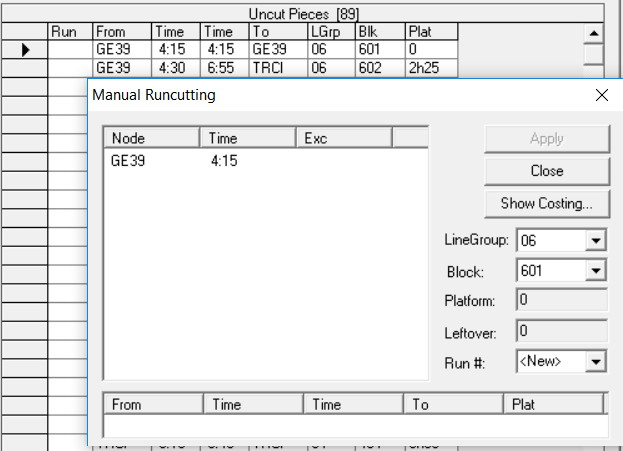
If you selected records in the Uncut Piecesgrid, the relief nodes or garages and their From Times appear in the left frame of the dialog box.
The fields in the Manual Runcutting dialog box are automatically filled as you select a relief point or garage in the left frame.
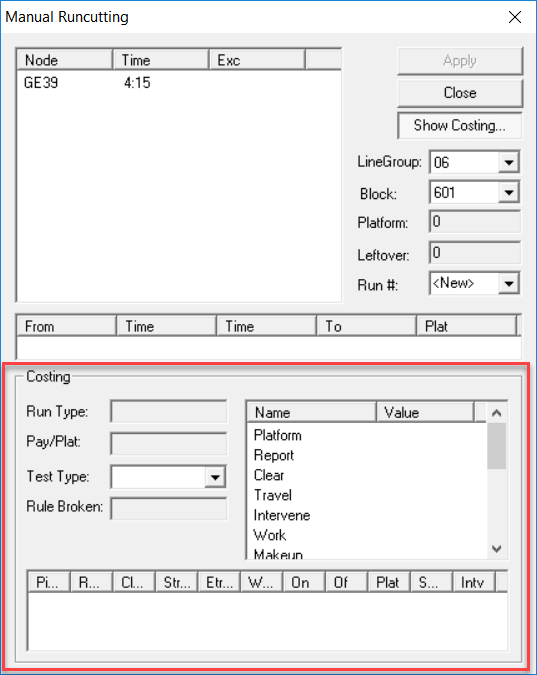
If you select records in the upper frame of the dialog box, they form the run identified in the Costing pane.
The bottom frame of the Costing pane shows the number of pieces created and the statistics pertaining to the piece.
| Field | Description |
|---|---|
| LineGroup | Line group to which the block you selected in the Uncut Pieces grid belongs. |
| Block | Block you selected in the Uncut Pieces grid. |
| Platform | Total platform of the block selected. |
| Leftover | Remaining platform time after you cut a segment from the block. |
| Run# |
The number you assign to the run. The word “New” appears in the field by default. If you do not type a value, the system automatically assigns a number to the run. |
| Show Costing Options (The following fields are shown when you click Show Costing.) | |
| Run Type | Shows the run type that you created after selecting a segment of the block in the Union Contract list. |
| Pay/Plat | The ratio of paid hours to platform time. |
| Test Type | A drop-down list of the run types in use. |
|
Rule Broken |
Shows the contract rule that the run type you selected in the Test Type field has violated, if any. |