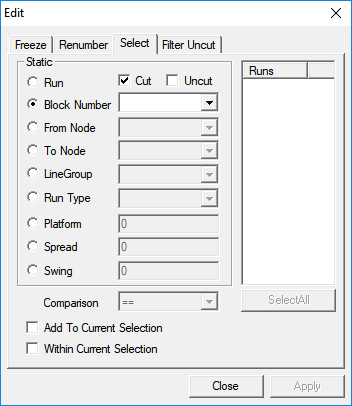
The Select function selects a group of runs or blocked pieces so
it can perform a function on the entire selection at once such as freezing and uncutting runs.
It also allows you to select blocks based on a particular criterion such as run or block number.
-
On the Runs tab, click the Edit
button:

The Edit dialog box appears.
-
Choose the Select tab.
-
In the Static frame, click the criterion you want to use. You can
only use one criterion at a time. The Run option is selected by
default.
-
Press CTRL and in the Runs list box,
select the numbers that you want.
To select all the blocks, click Select All.
-
To use another criterion such as Block Number, From
Node, To Node, Line Group or
Pattern, click the corresponding option and choose the
appropriate item from the list.
-
If you want the Platform, Spread or
Swing criterion, click the appropriate option and type the
necessary information in the field beside it.
If you use any of these criteria, the Comparison dialog box is
activated. Select the appropriate operational sign.
-
Click Apply.
The runs that match your criterion are highlighted in the
Runs grid.
- Optional:
To select more records using a different criterion, repeat steps 2 and 3 (if necessary)
and select the Add To Current Selection check box.
-
Click Apply again.
The runs you selected earlier remain highlighted and the records that match your
new criterion also appear highlighted.
-
Click Close.
-
Proceed with the action that you want to perform on the highlighted data such as
freezing the selected runs.