Entering and Viewing Notes in Dispatch Manager
You may want to record information and reminders while communicating with drivers during your shift.
Before you begin
About this task
Notes are saved in the system for the day of service.
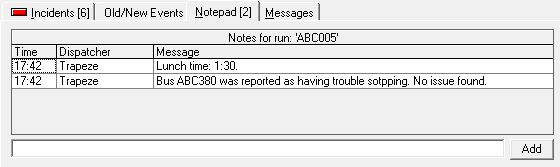
While you are looking at another tab, you can use the Notepad tab label to quickly determine the number of notes that have been entered for the run. For example, Notepad (2) means that there are two notes.
Procedure
- Click the Notepad tab.
-
At the bottom of the tab, type the note in the field, and then click
Add.