
Sending Text Messages from Dispatch Manager
Text messages can be sent to drivers as needed.
Before you begin
About this task
Procedure
-
Right-click on the grid.
A menu appears.
-
Select Send SMS Messages.
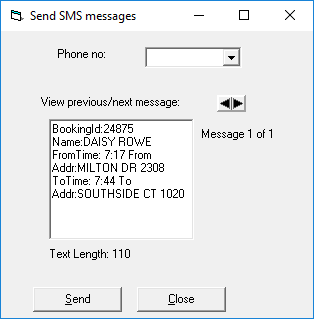
The Send SMS messages dialog box appears.
-
Enter the Phone no information:
- Type the phone number to be called.
- Select the phone number from the list.
This list is populated from for the selected vehicle.
-
In the text box, type a message for the recipient.
As you type, the Text length counts the number of characters you are entering.
-
Click Send.
The message is sent.
- Optional: To view previously sent messages, click the arrows beside View previous/next message to scroll through sent messages.