
Copying Trips from Another Sign-up Period and Service
You can copy trips from other sign-up periods or services.
-
Click .
The Copy Trips dialog box appears.
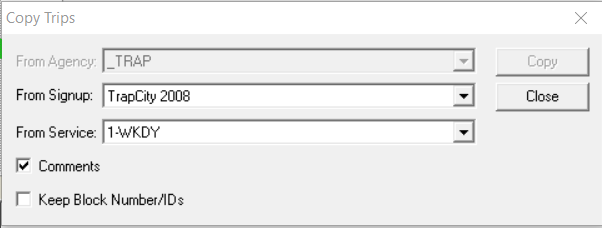
- (If in a multi-agency environment) In the From Agency list, select the appropriate agency. If not applicable, the field appears shaded.
- In the From Signup list, select the sign-up period from which you want to copy.
- In the From Service list, select the service from which you want to copy.
- Optional: To include the comments associated with the trips you want to copy, select the Comments check box.
- Optional: To maintain the Block numbers and IDs of the trips you want to copy, select the Keep Block Number/IDs check box.
-
Click Copy.
Any of the following messages may appear:
- If there are existing trips on the grids, a message asks you to confirm the delete action.
- If copying from another agency, a message also appears if a matching LineAbbr is found, but its number of nodes does not match that of the target. You can modify your selection or cancel the Copy.
- If there is no destination garage or division, trips and blocks are copied but no Garage ID or Division ID is assigned. A message appears prompting you to go to the Blocking Screen and assign the blocks to the appropriate garage or division.
- Click Yes as appropriate.
- Click Close.