Regenerating Trips
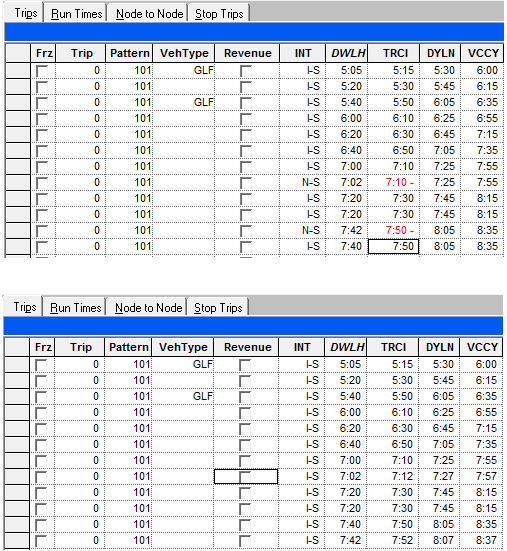
After you have built your trips and then made changes to the run times, some of your trips are marked N (without integrity) in the INT column on the Trips tab.
- Select the trips you want to regenerate. Refer to Selecting Trips for information.
-
Click the Edit button:
 The Trips Edit dialog box appears.
 -
Select the Regen (Regeneration) tab.
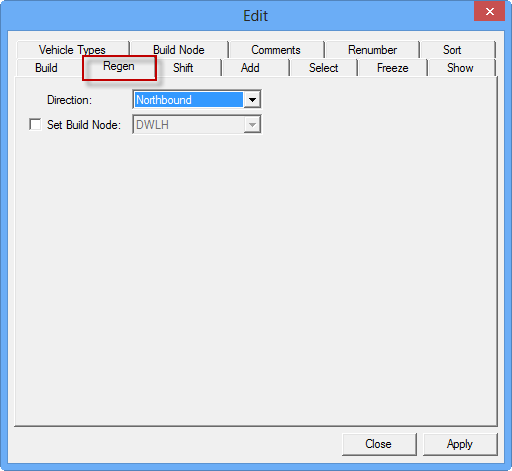
- In the Direction drop-down list, select the appropriate direction.
- To set a node as the build node, select the Set Build Node check box.
- From the list beside the Set Build Node check box, select the node from which you want to regenerate the schedule. The system recognizes the selected node as the build node and bases the run time on it.
- Click Apply.
-
Click Close.
The following graphic shows sample results after the Regen feature was applied. Note that the trip times have been slightly adjusted and the trips with N-S (in red text) in the upper graphic are shown with I-S (valid) in the bottom graphic.