You can view trips that form part of a block in Block
Mode.
Perform any of the following steps:
Click Trip Building > Context > Block Mode.
Click the Block Mode Display button: .
If the trips you are working with have been blocked, the trips of the first
block appear by default.
Press F3.
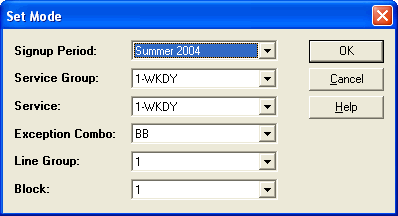
The Set Mode dialog box appears.
The values in the different fields match those that you set when you opened the Trip
Building screen. Make the changes as necessary to display the trips of the block you
want.
In the Signup Period drop-down list, select the appropriate
sign-up period.
In the Service Group drop-down list, select the appropriate
service group.
In the Service drop-down list, select the service you
want.
In the Exception Combo drop-down list, select the appropriate
exception/exception combination.
In the Line Group drop-down list, select the appropriate line
group.
In the Block drop-down list, select the block you want.
Click OK.
The following are some changes when in Block mode:
The Add and Sort tabs are not
available in the Edit dialog box.
On some tabs in the Edit dialog box, the
Line field allows you to select the line on which you want to
apply a functionality.
On some tabs in the Trips screen, the Direction field is
labeled Grid, which shows the Top and Bottom options.
(This also occurs when in Multi line mode.)
Edit the trips or perform any of the applicable procedures required.

 .
.