
Viewing Maintenance Records
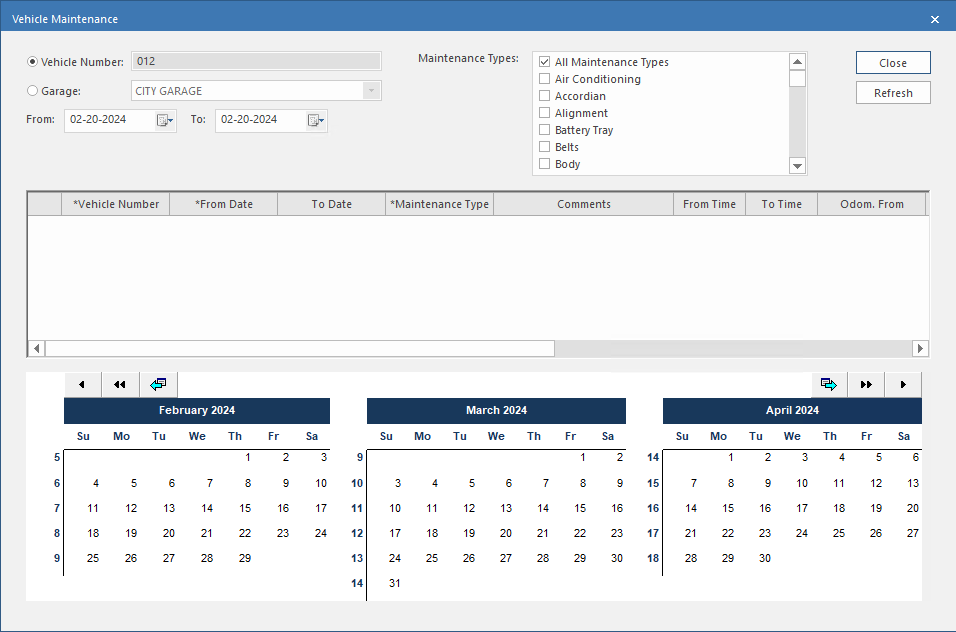
Search for and view maintenance records based on a vehicle number or garage for a selected day range and selected maintenance types.
- Open the Vehicle Assignment screen and set the Context (F3).
- Select a block in the Vehicle Assignment tab.
-
Select View Vehicle Maintenance:

-
Do one of the following:
- Select Vehicle Number to see maintenance records for the vehicle assigned to the block.
- Select Garage and then select a value in the dropdown list to see maintenance records for the selected garage. If the block has no assigned vehicle, Garage is automatically selected.
- Specify the maintenance record date range in the From and To fields.
- Select the Maintenance Types to show.
- Select Refresh.
- To see the maintenance record dates in the calendar, select a maintenance record in the middle pane of the dialog.