Place text in quotation marks for exact match search results.
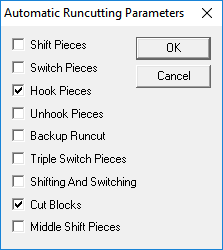
Selecting Automatic Runcutting Parameters
You can access the Automatic Runcutting parameters in the Automatic
Runcutting dialog box.
In the Automatic Runcutting dialog box, click
Parameters.
The Automatic Runcutting Parameters dialog box appears.
If you are starting to runcut a block piece, select all check boxes except the
Shifting and Switching and Backup Runcut
check boxes.
Click OK.
Note: Shifting and Switching can be a time consuming selection depending on the amount
of data and is best used when you are already in the improvement phase of runcutting.
You may, however, use this parameter during your preliminary runcutting to get a feel
for your data. Improving your runs is described in the section on About Runcutting
Analysis and Improvement.