
About Case Cards
Case cards are used to navigate cases in a selected stage or phase.
Cases represent collections of client infractions.
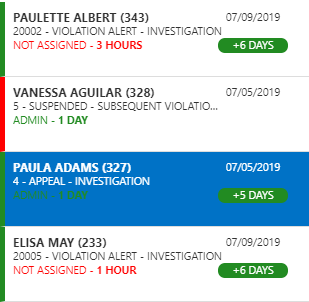
- Client name
For example, Paula Adams.
- Date the case was created
For example, 07/05/2019.
- Case number
For example, 327.
- Case numbers are automatically generated by the system when the case is created.
- Current stage and phase
For example, Appeal - Investigation.
- User assigned to the case
For example, Admin.
-
Only one user can be assigned to a case at a time. If a case is not currently assigned, the words Not Assigned and a count of how long the case has been waiting to be assigned appear.
-
Case cards for unassigned cases are marked by a red bar. Case cards for assigned cases are marked by a green bar.
-
- How long the user has been assigned to the case
For example, 1 Day.
- Number of days to complete the current phase
For example, +5 Days.
- The number of days left to complete the current phase uses full
days.
For example, if it’s 4:00 P.M. you may see 1 here but you would have the rest of today and tomorrow to complete the phase.
- The number of days left to complete the current phase uses full
days.
The search bar can be used to locate a case by client first name, client last name, case phase, assigned user name, date, or time period. For example, searching for aul could return a case card for a client named Paula, searching for days would return case cards where the assigned user has been assigned for 1 Day, and searching for hours would return case cards where the case has 17 hours until it meets the maximum investigation time period. If multiple words are typed, both must appear on the case card. For example, typing ur as could return a result for a client named Meghan Castillo whose assigned user has had the case for 20 hours.