
Viewing a Client's Suspension Status in the Workstation
Trapeze4 Workstation users (PASS) and Certification Workstation (PASS-CERT) users can determine the suspension status of clients under various policies without opening Service Infractions.
Before you begin
About this task
Procedure
- Click .
- Select a client.
- Click the Certification tab.
-
Near the Suspended from field, click the
Suspension History button:

The Client Suspensions dialog box appears or a message confirms that no suspensions exist for the client.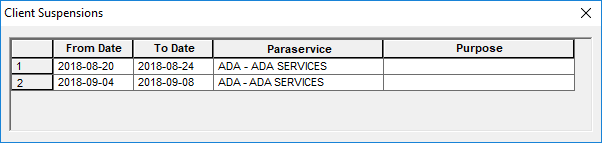
The From Date, To Date, Paraservice, and booking Purpose are listed (where applicable).
- After viewing the client suspensions, click X to close the dialog box.
Results
If the client has been suspended and a trip is set up in Trip Booking, a This client is suspended for the selected Paraservice, purpose and booking date. Proceed with booking anyway? message appears. If the security permission is denied, then no option to proceed is provided.