
Reinvestigating Cases
If a case is within a policy's defined grace period, it can be reinvestigated.
Before you begin
Procedure
-
In the policy list, for the policy being used, click Warning
Alert, Violation Alert, or
Appeal stage, and then click Compose
Suspension or Delivered phase.
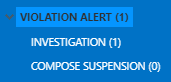
- Select the case card of the case to be reinvestigated.
-
Click Reinvestigate.
The Confirm Transition dialog box appears.
- Click OK.
Results
Remember: Cases in the
Compose Suspension phase, do not have a suspension added
until it is moved to Delivered. A suspension will only be
removed when the reinvestigation of a case occurs from or (when the case was appealed before the suspension
started).