
About Metrics
Metrics provide information about client trips, driver trips, and vehicle trips for specific infractions.
This can give you a better understanding of client, driver, and vehicle behavior patterns for each infraction.
Client Trips
Client Trips are broken into Scheduled trips, No Show trips, and Canceled trips.
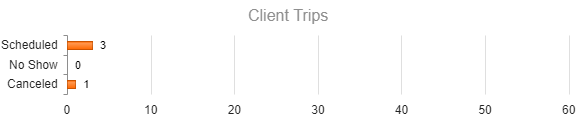
For example, in the above image, the client associated with the infraction had three scheduled trips in the last 30 days. They also had one canceled trip that meets the policy's infraction criteria.
If a scheduled trip is canceled and it does not meet the policy infraction criteria, it will not be included in the Client Trips metrics.
For more information about client trips, review the other infractions, or look for trips associated with the client in the Trapeze4 Workstation.
Driver Vehicle Trips
Driver vehicle Trips are broken into missed trips and picked up trips for both the vehicle and driver associated with the infraction.
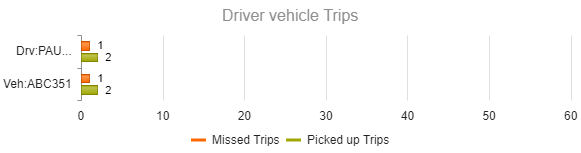
For example, in the above image, the driver (Paulette Villarreal, whose name is fully visible in the Infractions widget) has one missed trip and two picked-up trips in the last 30 days.
Driver trip metrics and vehicle trip metrics can also be limited to missed trips or picked up trips.
Click Missed Trips or Picked Up Trips to show or hide the respective graph.

If more information about the driver or vehicle is needed, look for trips associated with the driver or vehicle in the Trapeze4 Workstation.