
Adding Infraction Tables to Template Letters
Tables containing a list of client infractions can be added to template letters.
Before you begin
About this task
Procedure
- Place the cursor where the table containing the dynamically generated content should appear.
-
Insert a two-row table:
-
Click Table, then select a table size.
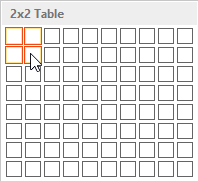
The table is a template and only needs to contain two rows: a heading row and a row that will be copied and populated with available information.A table is inserted into the document.
-
Click Table, then select a table size.
- Right-click on the table and click Table Properties.
- Click the Alt Text tab.
-
In the Title field, type
Infractions.
If the Title is spelled incorrectly, Service Infractions will not be able to populate the table.
- Click OK.
-
Insert MergeFields into the table as desired.
For example, you may use a three-columned table that includes the client information in Column A, the pick-up information in Column B, and the drop-off information in Column C.
