
Combining On Days
Put together runs on different days of the week.
-
In the Combine On Days frame on the Auto tab, select the
Monday check box on the first row and select the
Tuesday check box on the second row.
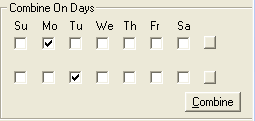
- Click Combine.
- Repeat step 1 with Tuesday and Wednesday. Select Tuesday on the first row and Wednesday on the second row.
- Click Combine.
- Proceed with combining the days of the week in the proper sequence.