After the exceptions runs have been cut in BlockBuster, load the runs from individual days of the week into the
Rostering screen.
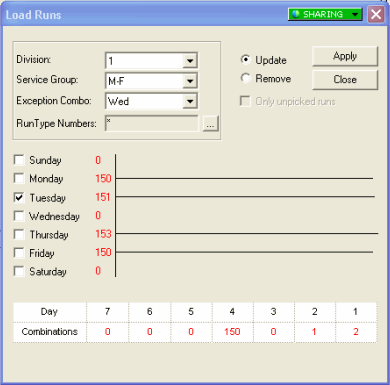
Click Rostering > Load Runs.
The Load Runs dialog box appears.
In the Division and Service Group
drop-down lists, select the division and service group whose runs you want to load.
In the Exception Combo drop-down list, select the weekday
exception you want to apply.
Click Apply.
The statistics at the bottom of the dialog box show the number of runs for the
selected day.
For the other days of the week, repeat steps 3 and 4. The runs from each day must be
loaded separately. If you select another day without clearing the previously selected day
or select two days at once, a warning message appears.
Click Close.
The following graphic shows the runs for different days of the week with
Wednesday being the last day whose runs are to be loaded: