
Assigning Vehicles to Frozen Trapeze PASS Runs
Assign vehicles to runs frozen in Trapeze PASS as needed.
- Open the Vehicle Assignment screen and set the Context (F3).
-
Drag an available vehicle to assign it to a frozen block (a block with the
 icon).
The PASS Run Unfreeze dialog appears.
icon).
The PASS Run Unfreeze dialog appears.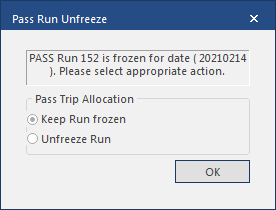
-
Do one of the following:
- To assign the vehicle but leave the run frozen, select Keep Run frozen and then select OK.
- To assign the vehicle to the run and make the run active, select Unfreeze Run and then select OK.