
About Assigning Funding Sources to Bookings
The Detail tab contains five lists with which to assign funding sources to a booking.
- Default All Client Funding Sources
- If set to Yes, the funding source fields in Trip Booking are
automatically populated with the client’s funding sources in the specified sequence by
default.
If set to No, only the first funding source appears in the first Funding Source field.
- Override Funding Sources
-
If set to Yes, the system allows you to select any funding source saved in the database in the funding source lists.
If set to No, the lists in the funding source fields list only those funding sources assigned to the client in Clients. Assigned funding sources are marked by an asterisk (*).
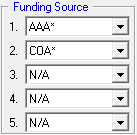
The default payment type specified for the first funding source on a booking populates the Payment Type field on the Supplementary Data tab of Trip Booking. If the first funding source does not have a default fare type assigned in ancillary setup, the default payment type set in system properties is used.
When rules related to an eligibility condition are in effect for a booking, the first funding source field shows the funding source selected for the eligibility condition.
Trip Funding Allowances ancillary data specifies whether you can book a trip with a funding source when the funding source limit has been reached.
About Funding Source Security
Funding Source ancillary data allows system administrators to assign a funding source to a specific security group.If you attempt to create a booking for a client who is assigned to a funding source belonging to a security group other than your own, a X does not have the funding source privilege for this operation. Do you want to continue? message appears.
Click No to cancel the booking, or click Yes to proceed with the booking. If you click Yes, funding sources belonging to other security groups are not available for selection in the Funding Source lists.